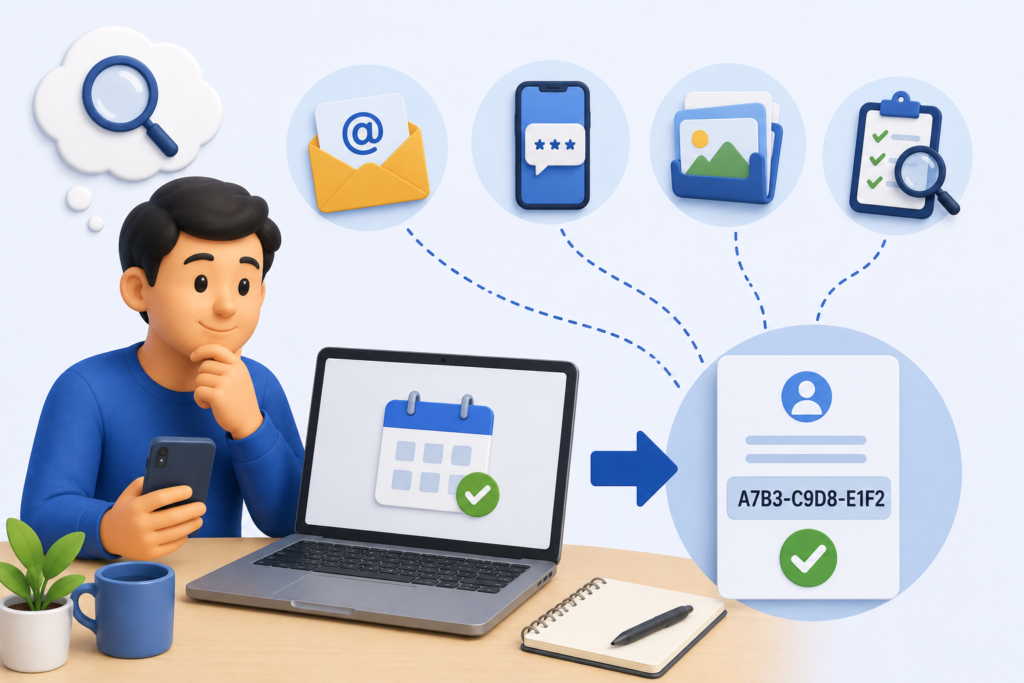
You booked your PSA slot, received your confirmation, and then somewhere between that moment and today the reference number disappeared. Maybe you deleted the email. Maybe you changed phones. Maybe you simply forgot to write it down. Whatever happened, you are now staring at the PSA appointment portal without a way to access your booking, and your appointment date may be approaching faster than you would like. The reference number is not just a formality, it is the key to managing your online appointment PSA booking, and without it, you cannot reschedule, cancel, track your slot, or retrieve your QR code. This guide covers every method available in 2026 to find or recover your PSA appointment reference number from the most obvious places people overlook to direct support channels that can retrieve it on your behalf.
What Is the PSA Appointment Reference Number?
The PSA appointment reference number is a unique alphanumeric or numeric code assigned to your booking the moment it is confirmed on the PSA Online Appointment System at PSA appointment. It typically appears as a combination of letters and numbers for example, something in the format REF-XXXXXXXX or a purely numeric sequence though the exact format may vary depending on when and how the booking was made.
This reference number serves several critical functions:
- It is your primary identifier in the PSA appointment system
- It is required to retrieve, reschedule, or cancel your booking through the portal
- It is included in your appointment confirmation slip and QR code
- It is what PSA customer support uses to locate your booking when you call for assistance
- It serves as proof of your booking if any technical issue prevents the QR code from scanning at the outlet
Think of it as the digital receipt for your appointment. Just as you would keep a payment receipt until a transaction is fully settled, your PSA reference number should be kept until you walk out of the PSA outlet with your document in hand.
Where to Find Your PSA Appointment Reference Number
Before concluding that your reference number is lost, check every location where it may have been sent or displayed. Most people find it in one of these places without needing to contact PSA at all.
Location 1: Your Email Inbox
The reference number was sent to the email address you registered during booking. This is almost always the fastest place to find it.
How to search your email:
Open your email application and use the search function. Try the following search terms one at a time:
- “PSA appointment”
- “Civil Registration”
- “PSA appointment”
- “PSA confirmation”
- “reference number”
- Your full name as entered during booking
If the email does not appear in your main inbox, check the following folders:
- Spam or junk folder Government portal emails are frequently auto-filtered as spam by email clients. This is the most common reason people believe the email never arrived
- Promotions tab If you use Gmail, automated emails from government portals sometimes appear in the Promotions or Updates tabs rather than the Primary inbox
- All Mail In Gmail, searching “All Mail” rather than just “Inbox” covers archived emails that may have been auto-archived
- Trash or deleted items If you previously cleared your inbox, the confirmation email may be in your deleted folder and still recoverable if not permanently purged
If you find the email, your reference number will be clearly displayed in the email body, subject line, or attached appointment slip. The QR code will also be in the same email.
Location 2: Your SMS Messages
The PSA appointment system sends the reference number and booking confirmation via SMS to the mobile number you registered during booking. Check your SMS inbox for a message from a short-code or automated number.
How to find it in your SMS:
On most smartphones, use the search function in your messaging app. Search for:
- “PSA”
- “appointment”
- “reference”
- “Civil Registration”
If your SMS inbox has thousands of messages, scroll back to the approximate date of your booking and look for a message from an unfamiliar short-code number; this is typically how automated government SMS messages appear.
If you changed phones since booking, the SMS may have been on your previous device. Check if the old phone is still accessible, or check if your messages were backed up to your Google or iCloud account and can be restored.
Location 3: The PSA Appointment Portal (If You Created an Account)
If you created a registered account when booking your PSA appointment rather than booking as a guest you can log into the portal and access your booking history.
Steps to retrieve via portal account:
- Open PSA appointment in your browser
- Click “Login” and enter your registered email and password
- Navigate to “My Appointments” or “Booking History”
- Your active and recent bookings will be listed with their reference numbers and appointment details
If you forgot your account password, use the “Forgot Password” function on the login page. Enter your registered email address and a password reset link will be sent. If the reset email does not arrive in your inbox within five minutes, check your spam folder.
Location 4: Screenshots on Your Phone
Many users screenshot the booking confirmation screen immediately after completing their booking. If you did this, check your phone’s photo gallery or screenshots folder.
On Android: Open the Gallery or Photos app and look in the “Screenshots” album. Browse backward to the date of your booking.
On iPhone: Open the Photos app, tap “Albums,” and look for the “Screenshots” album. Scroll to the approximate date of your booking.
Even a partial screenshot that shows only part of the confirmation screen may contain enough of the reference number to be useful; the full number can often be retrieved from PSA support with just a partial reference.
Location 5: Browser History and Bookmarks
If you did not close the confirmation page immediately after booking, your browser may still have it in your browsing history or you may have bookmarked it.
Check browser history:
On Chrome (Android/desktop): Tap the three-dot menu → History. Search for “PSA appointment” or scroll back to the booking date.
On Safari (iPhone): Tap the book icon → History. Scroll back to the booking date.
The confirmation page URL itself sometimes contains booking identifiers that can help support staff locate your record, even if the reference number is not directly visible in the URL.
Location 6: Messaging Apps and Forwarded Emails
Many people forward their confirmation emails or share their booking details through messaging apps sending the QR code to a family member, or forwarding the email to a second account for safekeeping.
Check the following:
- Viber messages if you sent the QR code to a family member, the message likely also includes the reference number
- WhatsApp messages same search as above
- Telegram if you saved messages to your Saved Messages folder
- Facebook Messenger if you shared the confirmation there
- Your own secondary email address if you forwarded the confirmation to a backup account.
How to Recover Your PSA Appointment Reference Number
If you have checked every location above and still cannot find your reference number, these recovery methods will help.
Recovery Method 1: Contact PSAHelpLine Customer Support
PSA customer support can retrieve your booking details using alternative information such as your registered name, mobile number, or email address even without the reference number itself.
What to provide when contacting support:
The more information you can provide, the faster support can locate your booking:
- Your full name as entered during booking
- The email address used for booking
- The mobile number registered during booking
- The approximate date you made the booking
- The PSA outlet you selected
- The document type you booked for
- Any partial reference number you may recall
Support staff will search the appointment database using this information and provide your complete reference number and current booking status.
Pro tip: Contact support as soon as you realize the reference number is missing do not wait until the day before your appointment. If the booking has expired or been cancelled due to a system issue, finding this out in advance gives you time to rebook.
Recovery Method 2: Request a Resend of the Confirmation Email
When contacting PSAHelpLine customer support, you can specifically request that the confirmation email be resent to your registered email address. This will re-deliver the original confirmation slip including the reference number and QR code to your inbox.
If the original email was sent to an address you no longer have access to a work email account after leaving a job, or a school email account after graduation inform the support agent. They can verify your identity through alternative means and update your contact details before resending.
Recovery Method 3: Use the Appointment Portal’s Manage Booking Feature
Some versions of the PSA appointment portal include a “Manage My Booking” or “Find My Appointment” feature on the homepage that allows you to retrieve booking details using your registered email and mobile number without needing the reference number itself.
Steps:
- Go to PSA appointment
- Look for “Manage Appointment,” “Find Booking,” or a similar option on the homepage or navigation menu
- Enter your registered email address and mobile number
- If the feature is available and your details match, your booking information including the reference number will be displayed
This feature may not always be available depending on the current version of the portal. If you cannot find it, proceed directly to contacting customer support.
Recovery Method 4: Check With the PSA Outlet Directly
If your appointment is at a specific PSA CRS outlet and you are running out of time before the appointment date, contact that outlet directly. Each PSA outlet maintains records of upcoming appointments and can sometimes verify a booking using your name and document type.
PSA outlet contact numbers vary by location. Check the PSA’s official website for the contact details of your specific outlet, or call the PSAHelpLine hotline and ask to be connected to or given the number of your chosen outlet.
Note: When arriving at the PSA outlet on your appointment day without a QR code, inform the information marshal immediately upon arrival. Explain that your confirmation email was not received or the QR code is unavailable. Staff can attempt to verify your appointment manually using your name, mobile number, and the document type you booked for. This is not guaranteed to succeed; some outlets strictly require the QR code but it is worth trying if recovery through other channels is not possible in time.
How to Prevent Losing Your Reference Number in the Future
The recovery methods above work, but they all take time and create unnecessary stress. These habits prevent the situation from occurring in the next booking.
Screenshot the confirmation page immediately. The moment the booking confirmation screen appears after OTP verification, take a screenshot before doing anything else. This is a five-second action that permanently preserves your reference number and QR code in your phone’s photo gallery, accessible even if you delete the email later.
Use a personal email address you check regularly. Gmail and Yahoo are the most reliable for receiving PSA confirmation emails. Work and school emails frequently filter automated government emails as spam or block them entirely. Using your personal account ensures the email arrives reliably and stays in a folder you check regularly.
Star or mark the confirmation email as important. Immediately after your booking, find the confirmation email and mark it as important, start it, or move it to a dedicated folder labeled “PSA Appointment.” This prevents it from being accidentally deleted or buried in a busy inbox.
Write the reference number in your phone’s notes app. A 10-second copy-paste from the confirmation email into a notes app on your phone labeled “PSA appointment [date]” creates a permanent local copy that survives email deletions and phone changes.
Forward the confirmation email to a secondary email address. If you have a backup email account, forwarding the confirmation creates a second copy in a separate inbox. Even if you lose access to your primary email, the backup preserves everything.
Send the QR code to a family member on Viber or WhatsApp. If someone else is attending the appointment on your behalf, you will send them the QR code anyway and their copy becomes a natural backup. Even if you are attending yourself, sending the code to a trusted contact creates an instant backup that can be retrieved from their phone if yours fails.
What Happens If You Cannot Recover the Reference Number Before Your Appointment
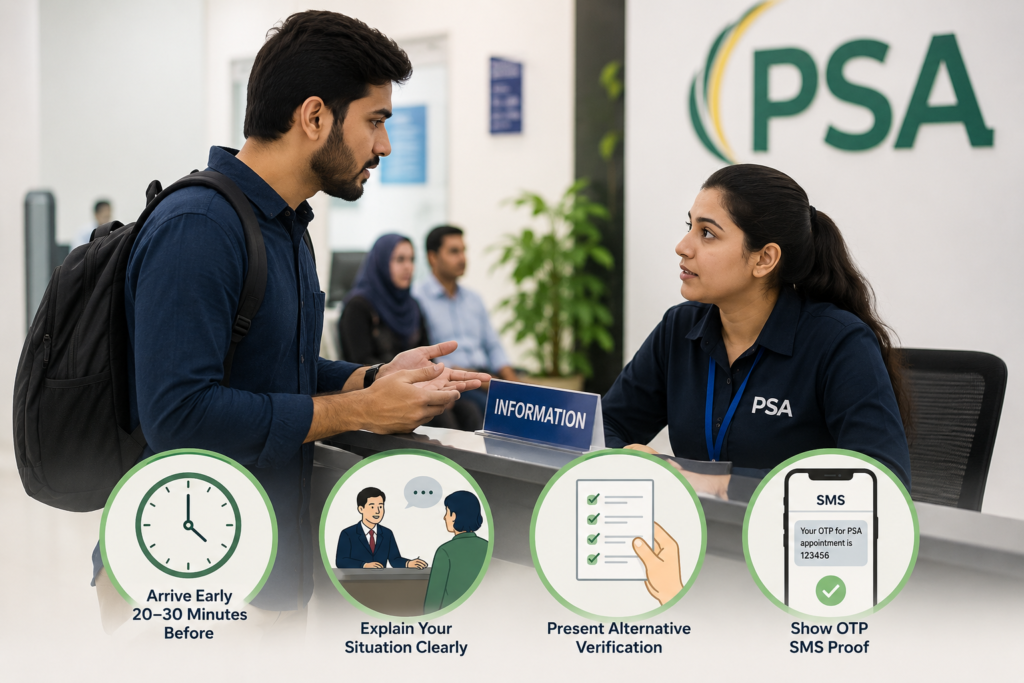
If your appointment is tomorrow and you have exhausted every recovery method without success, here is what to do.
Arrive at the PSA outlet early. Come at least 20 to 30 minutes before your scheduled time slot. Approach the information marshal or the front desk staff immediately and do not join the regular queue first.
Explain the situation clearly. Tell the staff that you have a confirmed appointment but cannot access your QR code or reference number. Provide your full name, the document type you booked for, and your registered mobile number.
Present alternative verification. Bring the last four to six digits of your reference number if you partially remember it. Bring a screenshot of the booking confirmation page if you have any partial image. Bring proof of your OTP receipt in your SMS this confirms that you completed the booking process.
Be prepared for the possibility of rebooking. Some PSA outlets will accommodate walk-in exceptions at their discretion particularly senior citizens, PWDs, and pregnant women but the standard policy requires a valid QR code for entry. If staff cannot verify your appointment manually, you may need to rebook and return on a new appointment date.
This is a situation that proper reference number preservation prevents entirely which is why the habits in the previous section are worth adopting from your very next booking.
Frequently Asked Questions
Is the reference number the same as the QR code?
No. The reference number is an alphanumeric code that identifies your booking in the PSA system. The QR code is a scannable image generated from your booking details, including the reference number. The QR code is displayed on your appointment slip but the reference number is the underlying identifier that makes the QR code work and that PSA support uses to locate your booking manually.
How long is a PSA appointment reference number valid?
The reference number corresponds to a specific appointment slot and remains valid until that slot either passes or is cancelled. After your appointment date passes whether you attended or not the reference number is archived in the system but is no longer actively usable for rescheduling or cancellation.
Can I reschedule my PSA appointment without the reference number?
You need the reference number to use the self-service reschedule function in your confirmation email or the portal. However, if you contact PSAHelpLine customer support with your personal details, they can look up your booking and either provide the reference number or process the reschedule directly on your behalf.
What if I booked as a guest without creating an account?
Guest bookings are retrievable through PSAHelpLine customer support using your name, mobile number, email address, and approximate booking date. Without a portal account, you cannot self-serve the retrieval support staff are your primary recovery option.
Can someone else use my reference number to access my appointment?
The reference number is linked to your personal details and the document type you booked. While the number itself does not contain sensitive personal data, sharing it with an unauthorized person could allow them to cancel or reschedule your appointment. Treat your reference number with the same care as any other personal booking identifier.
Final Thoughts
Your PSA appointment reference number is a small but critical piece of information one that takes five seconds to save and hours to recover if lost. The confirmation email, the SMS, a phone screenshot, and a quick note in your phone’s notes app are all it takes to ensure this number is always within reach, no matter what device you switch to or how many times you clear your inbox. If you have already lost it, PSAHelpLine customer support is the fastest path to recovery. Have your name, email, and mobile number ready, and support can retrieve your booking in minutes. And the next time you book, screenshot first, ask questions later.